Running out of stock costs more than a sale. It affects customer confidence and can send shoppers to a competitor. Keeping too much inventory creates another problem. It increases storage costs and ties up working capital.
According to McKinsey companies that use AI and advanced analytics in supply chain management can reduce inventory levels by up to 20% while improving product availability.
A report from Statista also found that global retail eCommerce sales are expected to exceed $8 trillion by 2028. As online sales grow, businesses need better inventory visibility across every sales channel.
Managing inventory becomes harder as your business grows. You may sell through your website, physical stores or other marketplaces. Every sale changes your available stock. Without accurate inventory updates, overselling becomes a real risk.
Adobe Commerce Inventory Management helps solve this problem. It gives you one place to manage inventory across warehouses, stores, and sales channels. Businesses that invest in Adobe commerce development can also build inventory workflows that support future growth.
In this guide, you’ll learn how Adobe Commerce Inventory Management works, its key features, and how it helps businesses reduce stockouts while improving order fulfillment.
How Does Adobe Commerce Inventory Management Work?
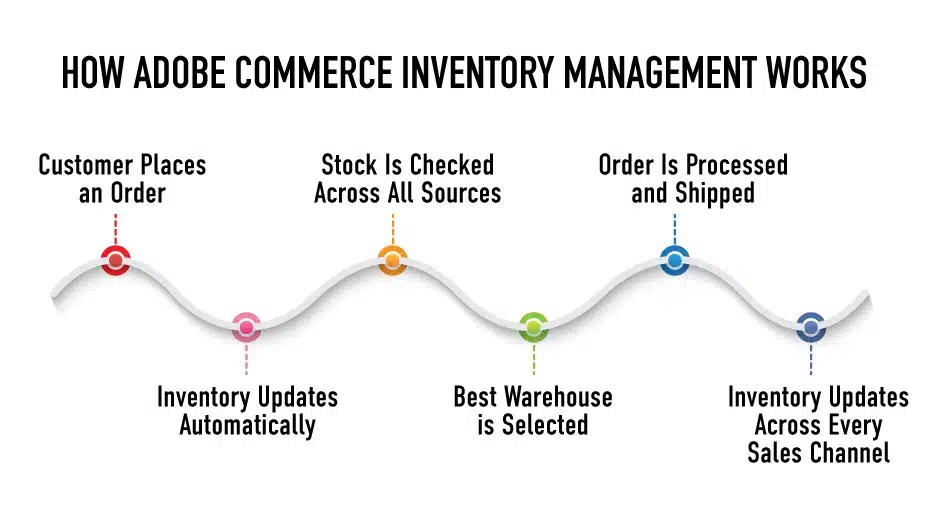
Adobe Commerce gives you one place to manage your inventory. Instead of updating stock manually, the platform keeps inventory synchronized across your sales channels.
Every order updates your available inventory automatically. This helps prevent overselling and gives your team a more accurate view of available stock.
The platform also supports multiple inventory sources. These can include warehouses, retail stores or distribution centers. When an order is placed, Adobe Commerce chooses the best location based on your inventory settings.
This helps businesses fulfill orders faster while keeping inventory accurate. Customers receive a better shopping experience because products are available when they need them.
Manage inventory smarter with automated stock updates and fulfillment.
Key Features of Adobe Commerce Inventory Management
Adobe Commerce includes several built-in tools that make inventory management easier.
You can track inventory across multiple locations from one dashboard. The platform also provides real-time inventory updates, low stock alerts, and backorders. Its Source Selection Algorithm helps fulfill orders from the most suitable location.
As your business grows, the platform grows with you. A well-planned Adobe commerce implementation also makes it easier to manage inventory across multiple warehouses and sales channels.
Inventory Management also includes:
- Real-time inventory tracking.
- Multi-source inventory support.
- Low stock notifications.
- Flexible fulfillment options.
- Reservation system to reduce overselling.
These features help businesses improve inventory accuracy without adding more manual work.

Explore features that improve inventory accuracy and operational efficiency.
How Adobe Commerce Works with Other Business Systems
Inventory does not work alone. It connects with almost every part of your business.
Your inventory system needs to communicate with your ERP, CRM, shipping partners, and order management platform. When these systems work together, your team spends less time updating data manually.
Adobe Commerce Inventory Management is built to support these connections. Inventory updates automatically as orders are placed, shipped, cancelled, or returned. Everyone works with the same information.
The platform can integrate with many business systems, including ERP software, CRM platforms, shipping providers, order management solutions, and Point of Sale (POS) systems. This creates a better workflow and reduces the chance of inventory errors.
A well-designed Adobe commerce solution also makes these integrations easier to manage as your business grows.
Instead of switching between different applications, your team can focus on fulfilling orders and serving customers.
Why Choose Adobe Commerce Inventory Management?
Many inventory systems can track stock. Adobe Commerce does much more than that.
It helps businesses manage inventory across multiple warehouses and online sales channels from one platform. Stock stays accurate because updates happen automatically.
This gives businesses more confidence when accepting orders. Customers also enjoy a better experience because products are available when they expect them.
Adobe Commerce Inventory Management helps businesses:
- Reduce stockouts
- Prevent overselling
- Improve order fulfillment
- Support omnichannel selling
- Scale as the business grows
As your operations become larger, inventory management becomes more complex. Adobe Commerce is designed to grow with you instead of creating more manual work.

Reduce stockouts while improving fulfillment and customer satisfaction.
Choosing the Right Inventory Management Solution
Every business manages inventory differently. An online store does not have the same needs as a global retailer with multiple warehouses.
When choosing an inventory management solution, think about your future as well as your current needs.
Ask yourself a few simple questions.
- Will you sell via multiple channels?
- Will you add more warehouses?
- Do you need real-time inventory updates?
- Will you integrate with ERP or CRM software?
The answers will help you choose a platform that supports your long-term growth.
If you expect your business to expand, investing in the right Adobe Commerce implementation from the beginning can save time while reducing future migration costs.
How Adobe Commerce Works with Other Business Systems
Inventory is only one part of your business. It also needs to work with your orders, shipping, and customer data.
Adobe Commerce connects with many business systems. When someone places an order, your inventory updates automatically. Your team always sees the latest stock levels.
Adobe Commerce can connect with ERP software, CRM systems, shipping partners, Point of Sale (POS) systems, and order management tools. This keeps your data accurate and lowers manual work.
As your business grows, these connections become even more important. A strong Adobe commerce development partner can also help you connect inventory with the tools you already use.
Your team spends less time updating spreadsheets. They spend more time serving customers.
Why Choose Adobe Commerce Inventory Management?
Many platforms can track inventory. Adobe Commerce helps you do much more.
You can manage stock across warehouses, stores, and online sales channels from one place. Every stock update happens automatically. This helps reduce mistakes and keeps inventory accurate.
Your customers can buy with confidence because the products they see are available.
Adobe Commerce also helps you:
- Reduce stockouts
- Prevent overselling
- Speed up order fulfillment
- Grow without adding more manual work
As your business grows, your inventory grows too. Adobe Commerce is built to handle that growth.
Choose a Solution That Can Grow with You
Good inventory management keeps your business moving. It helps you avoid stockouts. It reduces overselling. It also helps customers get what they need without delays.
Adobe Commerce Inventory Management gives you one place to manage stock across warehouses, stores and sales channels. Inventory updates automatically. Your team always has the latest information.
As your business grows, inventory becomes harder to manage. Adobe Commerce makes that job easier. The right Adobe Commerce consulting can also help you build an inventory strategy that supports future growth.
If you want better control over your inventory, Adobe Commerce is a smart choice. It helps you save time. It improves order accuracy. It also creates a better shopping experience.