According to HubSpot, 88% of online consumers are less likely to return to a site after a bad experience. But drop-offs like that rarely happen all at once. They creep in. First, a page takes too long to load. Then, the checkout gets a little frustrating.
What used to run smoothly starts feeling sluggish. At first, it’s invisible. Everything clicks. Fast loads, seamless purchases, no complaints. Then the friction builds. Quietly. Until it’s loud enough to hit growth.
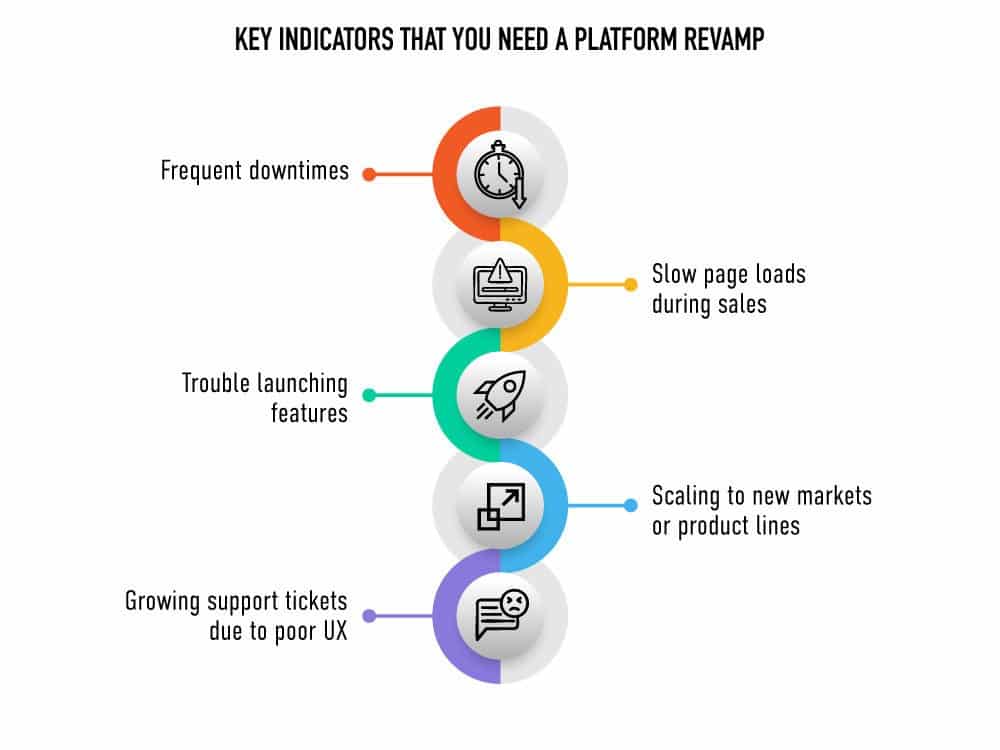
A feature you need doesn’t exist. A Sale day turns into a site crash. Your team starts building workarounds, duct-taping together plugins and patches. And that’s when you start to wonder if the very foundation of your online store is the thing holding you back.
This is exactly where Gymshark found itself. The UK-based fitness brand was growing fast. A Black Friday crash, in response to an overwhelming surge of traffic, brought everything to a halt.
It wasn’t about features or design anymore. It was about survival. That incident became the impetus leading Gymshark to Shopify Plus, a platform built to handle sudden, unexpected growth spikes. That replatforming decision changed the company’s trajectory.
Replatforming can be a turning point for the entire business. It’s an opportunity for the company to adapt, rather than get stuck managing a website that’s already broken.
This guide from Ziffity is built to help you prepare for that moment. Think of it as a map, one that enables you to make sense of the shift, prepare for the risks, and set your business up to move forward with confidence.
The Tipping Point of Platforms: Finding Your “Why”
Replatforming isn’t just about solving a technical issue. It is about deciding to support the future of your business. You are not reacting to pressure. You are choosing to grow.
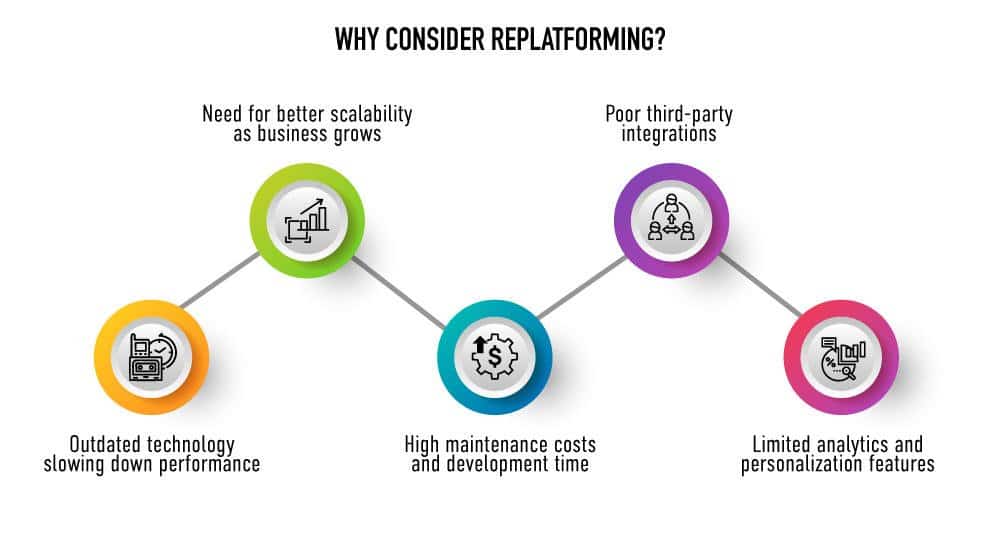
Companies typically replatform for a few key reasons:
- Scalability: The current system cannot keep up with demand.
- Customer Experience: Expectations have changed, and the platform cannot deliver.
- Efficiency: Internal processes are slowed down by outdated tools.
- Cost: Maintenance and workarounds are eating into time and budget.
Companies typically replatform for a few key reasons:
The need to change usually does not appear all at once. Pages slow down. Checkout gets clunky. Teams spend more time fixing than building. It adds up and eventually starts affecting growth.
That is when companies need to stop patching the old system and start looking ahead.
Replatforming works best when it is done with a clear purpose. Know what is not working and what you want to improve. That intent should guide every decision, moving forward.
It is not just about switching tools. It is about building a better foundation for what comes next.
The Ultimate eCommerce Replatforming Checklist
Replatforming is not a simple upgrade. It’s a series of decisions that affect every part of the business, from technology to operations to how teams work together. Success depends on how well you understand the process ahead of you. This checklist breaks that process into focused, practical steps, so you can move forward with clarity and control.
eCommerce Replatforming Checklist
1. Planning & Strategy
- Define clear reasons for replatforming
- Align goals across leadership, marketing, IT, and operations
- Set measurable success metrics (speed, conversions, uptime, etc.)
- Identify internal stakeholders and decision-makers
- Create a realistic timeline with built-in buffers for delays
- Establish a change management plan
2. Platform Selection
- List must-have and nice-to-have features
- Evaluate scalability, flexibility, and ease of use
- Assess integration capabilities with your existing tech stack
- Review platform security, compliance, and performance
- Request vendor demos, case studies, and customer references
- Shortlist vendors and involve key teams in evaluation
3. Data Preparation & Migration
- Audit current data for accuracy and relevance
- Clean and categorize data to be migrated
- Map old data structures to the new platform
- Plan for customer accounts, orders, and product data
- Set up secure backups and recovery processes
- Validate data integrity after test migrations
4. Design & Development
- Wireframe key user journeys and flows
- Prioritize mobile-first and accessible design
- Rebuild templates for performance and SEO
- Customize integrations, APIs, and business logic
- Review and optimize for site speed and usability
- Sync development with content and brand teams
5. Testing & Quality Assurance
- Test all major user paths (homepage, product, cart, checkout, etc.)
- Run performance and load tests for peak traffic readiness
- Verify third-party integrations and plugins
- Set up UAT (user acceptance testing) with internal teams
- Document bugs and track fixes in a QA log
- Finalize go-live checklist with sign-offs
6. Launch & Post-Launch
- Monitor key metrics in real time post-launch
- Ensure customer support and tech teams are on standby
- Collect customer feedback and issue reports
- Conduct a post-launch audit after 7–14 days
- Roll out improvements and phase-two features
- Document lessons learned for future reference
Addressing Change and all its Moving Parts
Replatforming isn’t just about picking a new system. It impacts teams, workflows, and business priorities in ways that aren’t always obvious at first. What seems like a simple switch often reveals deeper issues. That’s why a clear, step-by-step plan is essential.
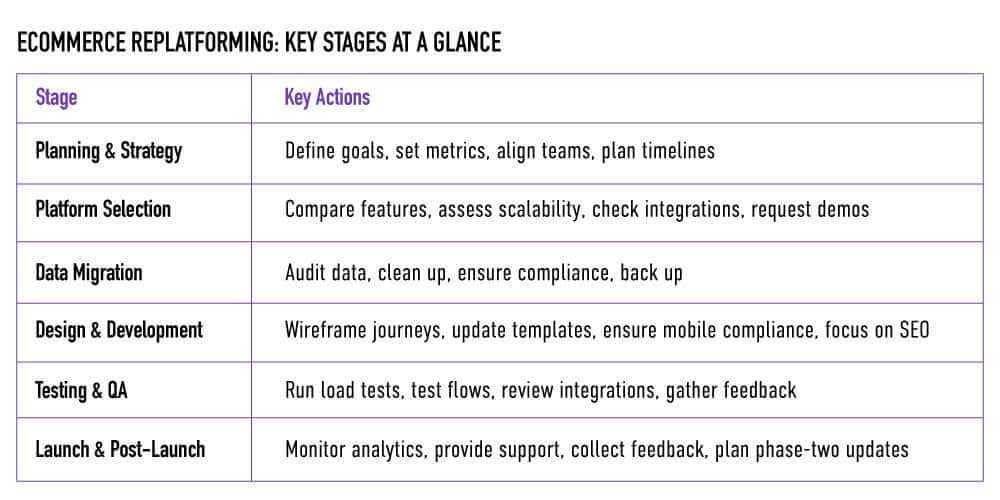
Planning and Strategy:
This stage sets the foundation. Define the scope, build the timeline, and align leadership, marketing, operations, and IT around a shared plan. This is not just a technical project. It is a business shift that affects every part of the organization. A strong, realistic plan helps avoid confusion and keeps the migration on track.
- Define the goals of your migration.
- Set success metrics: speed, cost, conversion, customer satisfaction.
- Identify internal stakeholders and create a communication flow.
- Plan timelines with buffer zones for the unknown.
Every migration brings a degree of uncertainty. A well-structured plan accounts for these variables and ensures the team is prepared to address them effectively.
Platform Selection and Vendor Evaluation:
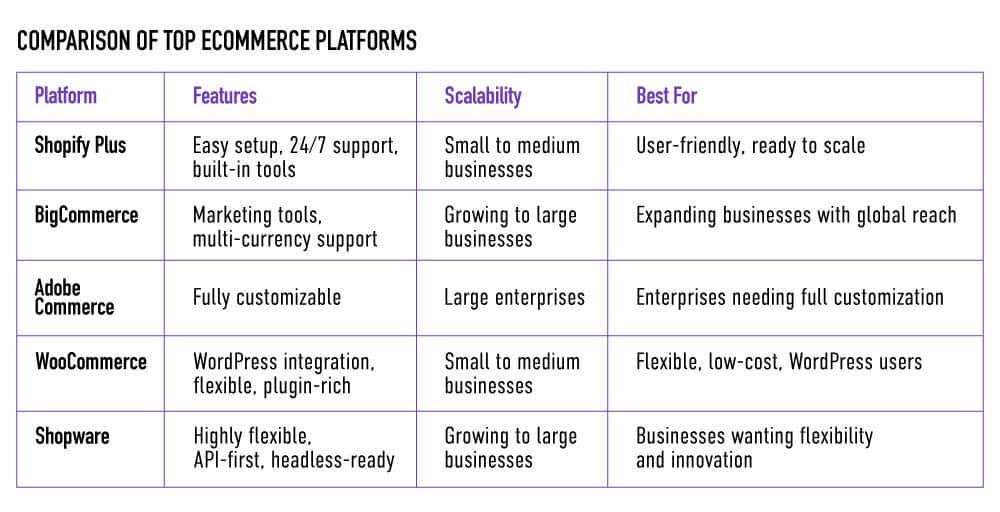
Platform selection is a technical decision with long-term impact. It’s about choosing a system that can scale with your business, handle complexity, and integrate with your existing tools. Some platforms offer great flexibility but require more customization. Others are easier to deploy but may limit future growth. Evaluate core features, extensibility, performance, and vendor support. The proper choice balances immediate needs with long-term goals.
- Compare core functionalities and scalability.
- Examine integration capabilities with your current tools.
- Dig into vendor support and documentation.
- Request demos and case studies from businesses like yours.
Remember, the right platform doesn’t just meet your needs today. It adapts to the version of you five years from now.
Data Migration and Preparation:
Data migration is a critical step in the replatforming process. Start by auditing your current data to identify what needs to be retained, updated, or removed. Ensure data is accurate, consistent, and secure before the move. This is also a good time to address compliance requirements and establish a solid backup plan. Clean, organized data lays the foundation for a smooth transition and long-term platform success.
- Audit your existing data.
- Map out what stays, what goes, and what transforms.
- Ensure compliance and security protocols.
- Back everything up, then back it up again.
Because in the end, clean data means a clean start.
Design and Development:
If your platform is the foundation, your design is the front door. This is where brand, function, and performance converge.
But don’t just recreate your old experience. Reimagine it. Your new platform is an opportunity to think bigger.
- Wireframe user journeys based on fresh data.
- Rebuild or update key templates for performance.
- Ensure mobile-first and accessibility compliance.
- Keep SEO and site speed at the forefront.
Good design isn’t just aesthetic. It’s behavioral science in motion.
Testing and Quality Assurance:
Every great replatforming effort has a moment of fear. This is when you test everything and try to break it – before your customers do.
- Run load tests and simulate peak traffic.
- Test payment flows, account creation, and checkout paths.
- Review integrations with third-party systems.
- Create feedback loops with internal testers and early users.
Think of this as a dress rehearsal for your brand’s future.
Launch and Post-Launch:
Most businesses treat launch day like a finish line. It isn’t. It’s the starting gate of a faster race.
What matters now is how you monitor, adapt, and optimize.
- Monitor analytics in real time.
- Be ready with customer support and issue triage teams.
- Collect user feedback.
- Plan phase-two enhancements and new feature rollouts.
You can’t declare success at launch. It comes from how you evolve afterwards.
Key Considerations and Potential Pitfalls
Recognizing the Hidden Complexity
Replatforming often begins with a promise. A better system. Faster load times. Seamless integrations. And while that promise may be real, what lies underneath is a different story.
The reality? Most businesses underestimate the sheer complexity of moving platforms. It’s not just about code. It’s about people, processes, and assumptions. You’re not just migrating data. You’re disrupting habits.
Avoiding Feature Overload
One of the first pitfalls is feature overload. The new platform comes with dozens of shiny tools, and teams feel the urge to use them all. But more features don’t always mean more value. In fact, they can distract from what truly matters – delivering a great experience.
The solution is focus. Know what you need now. Plan for what you might need later.
Preparing for Data Challenges
Data migration sounds straightforward. But once you begin, inconsistencies emerge. Formats don’t match. Duplicates appear. Clean data becomes the difference between a smooth launch and a crisis.
This is where planning wins. Audit early. Validate often. Never assume your data is as clean as you think it is.
Engaging the Right Expertise
Perhaps the greatest misconception is that your internal team can handle it all. But successful replatforming isn’t just a project. It’s an orchestration.
That’s why the most innovative companies bring in experts. People who’ve made the leap before. Who know the blind spots. Who understand that what looks like a technical job is, in fact, a human one.
Because in replatforming, what you don’t know tends to matter most.
Navigating Your Migration with Confidence
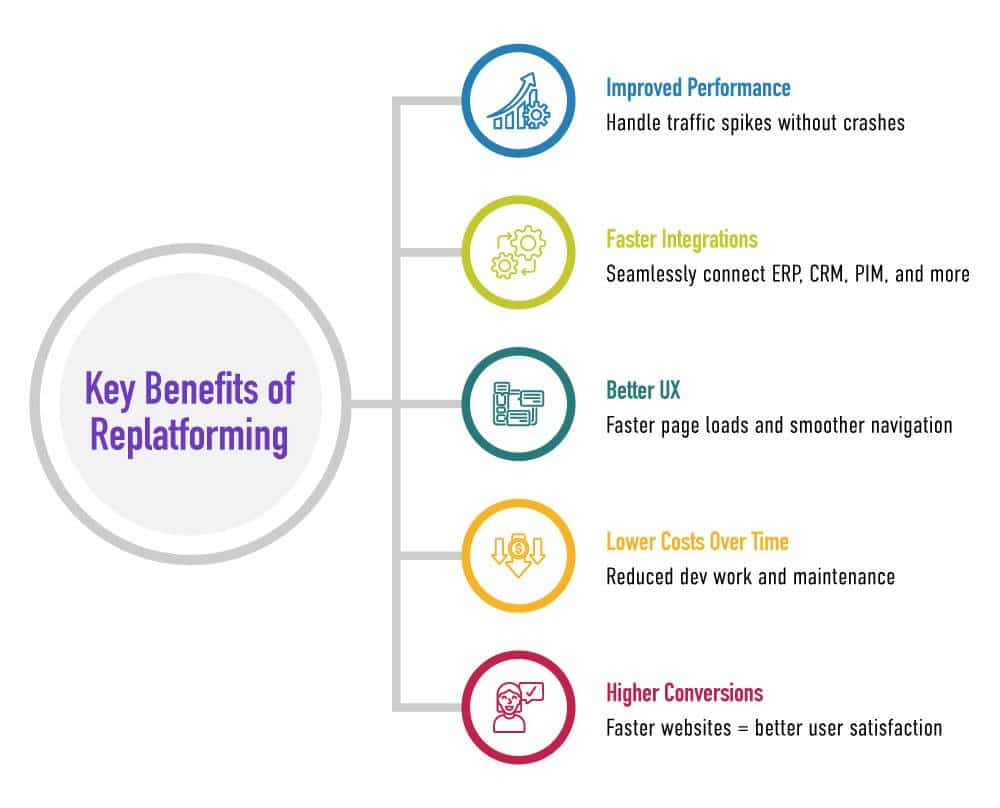
Replatforming isn’t just a technical decision. It’s a strategic pivot. It’s the moment when a business stops patching problems and starts building for the future. Behind every successful migration is a company that recognized the signs early – slowdowns, limitations, inefficiencies – and dared to act. What they gain is more than a new system. They gain freedom. Freedom to scale, to adapt, to deliver better experiences to the people who matter most.
But the journey is not one to take lightly. It requires clarity, discipline, and, often, an outside perspective. The most successful replatforming stories are not about flawless execution. They’re about preparation, focus, and asking the right questions. If you’re standing at that crossroads, know this: with the right plan and the right partners, replatforming can become your company’s smartest move yet.
Ready to take the next step? Ziffity is here to help you build a platform that grows with your ambition.